In briefCompare the configured account and your intended workflow, not platform labels alone. Check position handling, treat depth as broker-specific, and match automation to its native runtime.
Choose by workflow, not by a platform winner
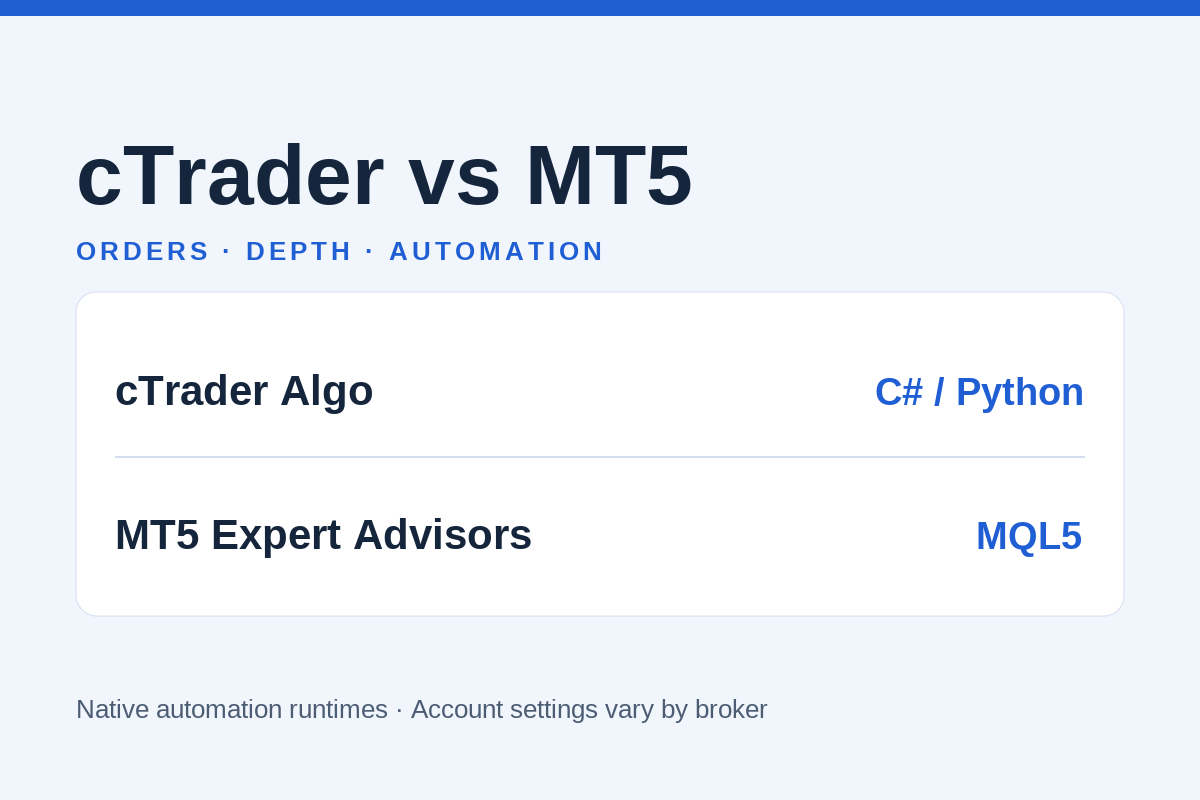
A useful cTrader vs MT5 comparison starts with three practical checks: how you will manage orders and positions, what the displayed market depth actually represents, and where your trading robot will run. Neither platform name settles those questions. Both support netting and hedging account models, while broker configuration matters. For automation, cTrader Algo supports native C# and Python, whereas MT5 Expert Advisors use MQL5 natively. Those distinctions provide a more useful starting point than a general ranking.
Start with one written trading scenario rather than a long feature checklist. For example, imagine opening a position, adding another trade in the same instrument, then entering a trade in the opposite direction. Separately, imagine checking whether displayed prices include enough quoted size for a hypothetical order. Finally, decide whether your intended robot already exists in C#, Python or MQL5. Each scenario asks a different question, so evidence from one should not substitute for another.
You can make this comparison without funding an account. Read the relevant platform documentation, inspect available simulator settings and record any configuration details you cannot verify. Where an unfunded demonstration environment is accessible, use it to rehearse the scenario rather than to infer future execution quality. Keep a short worksheet with columns for the task, the setting observed and the unresolved question. An unanswered account-specific question is a reason to investigate, not a reason to assume that both platforms behave identically.
For the wider selection framework, use the forex platform comparison to organise requirements before narrowing the decision to cTrader or MT5.
Follow the workflow that matters
Verify the account model and rehearse an opposite-direction trade.
Identify what the depth display measures and whose quotes it represents.
Match the robot’s native language, runtime and test assumptions.
Separate order entry from position accounting
For manual trading, first separate the instruction you submit from the way resulting exposure is recorded. MetaTrader’s account and execution documentation and cTrader’s positions and deals documentation describe the relevant account concepts. Both platforms support netting and hedging models. It is therefore inaccurate to treat hedging as exclusive to one platform, or to assume that every account using the same software will organise positions in the same way.
Use a hypothetical sequence of equal-sized trades to expose the difference. First buy an instrument, then buy the same amount again, then sell that same amount. In a netting model, trades contribute to one net position in that instrument: the second purchase increases the long exposure and the sale reduces it. In a hedging model, separate positions can coexist, including opposite-direction exposure. The important comparison is the configured model, not whether the interface lets you find a buy or sell button.
Write down the result you expect after every instruction before trying the sequence in an unfunded environment. Then compare the position record with that expectation. Also distinguish submitting a new opposite-direction order from explicitly closing an existing position; do not assume those actions are interchangeable in every account model. This exercise is about accounting behaviour, not a claim about execution speed or trading outcomes. If the selected account mode is unclear, mark the manual workflow as unverified until its configuration is established.
Keep those account questions beside the platform overview in the cTrader guide, rather than treating a screenshot as proof of how a particular account will behave.
| Task | cTrader | MT5 |
|---|---|---|
| Manage opposing trades | Check the account’s netting or hedging mode. | Check the account’s netting or hedging mode. |
| Inspect available depth | Standard, price and VWAP views; confirm the feed. | Depth of Market; confirm what the broker supplies. |
| Run native automation | cTrader Algo in C# or Python. | Expert Advisor in MQL5. |
| Reproduce a simulation | Record cBot data, spread and commission settings. | Record Strategy Tester data, execution and cost assumptions. |
Documented software capabilities. Availability and account configuration must be checked separately.
Read depth as a local view, not the whole market
Spotware documents standard, price and VWAP depth-of-market views for cTrader. That is evidence about the software’s available ways of presenting depth, not evidence that every account receives identical quotes or size. Depth is venue- or broker-specific; it is not a complete map of global OTC forex liquidity. Apply the same discipline when examining depth in an MT5 setup: establish what is being supplied before drawing conclusions from the display.
Keep three questions separate. What view is the software showing? Which broker or venue supplies the displayed information? What does that information allow you to calculate? A documented depth mode answers the first question but does not automatically answer the others. Likewise, a more detailed-looking ladder does not by itself establish better execution. Record the instrument, the displayed price levels and their associated quantities, including the units used for size, before attempting any arithmetic.
A useful unfunded exercise is to copy two hypothetical levels into a worksheet and label them as illustrative rather than observed liquidity. Calculate the weighted price for an order whose size exactly matches those levels, then change the quantities and repeat. This demonstrates why size matters alongside price. It does not establish that a live order would receive those fills. If quantities are missing, or their units are uncertain, stop at describing the display rather than inventing a weighted execution estimate from incomplete inputs.
Use the explanation of liquidity in forex to keep the broader market concept separate from one account’s depth display.
Work through two hypothetical price levels
Suppose a hypothetical EUR/USD buy order is for 300,000 EUR. Your worksheet contains 100,000 EUR offered at 1.1000 USD per EUR and 200,000 EUR offered at 1.1003 USD per EUR. Assume, solely for the calculation, that the entire order fills against those two levels at those exact quantities and prices. The weighted price must reflect twice as much volume at the second level as at the first; a simple average of the two prices would not do that.
Multiply each quantity by its price to calculate the corresponding USD amount. The first level contributes 110,000 USD and the second contributes 220,060 USD. Their total is 330,060 USD for 300,000 EUR, producing a weighted price of 1.1002 USD per EUR. Check the result in two ways: it lies between the two input prices, and it is closer to 1.1003 because the larger quantity is assigned to that level. These checks help catch reversed weights or inconsistent units.
This is a weighted fill estimate under stated assumptions, not expected execution and not an all-in trading cost. The two levels do not include a separate commission input, and the calculation does not prove that the displayed quantities would remain available when an order arrived. Its value is educational: it shows how multiple price levels combine. Repeat it with equal quantities to obtain the midpoint, then restore the original quantities. Keep every version labelled hypothetical so the arithmetic is never mistaken for an execution forecast.
Weight each price by its quantity
The larger quantity gives the second price twice the weight of the first.
Identify the robot’s native runtime
For automation, begin with the code you intend to run rather than the language you would prefer a platform to support. Spotware’s cTrader Algo documentation identifies native C# and Python support. MT5’s native Expert Advisors are written in MQL5. This is a material distinction for choosing an environment, but it is not a statement that one language produces better trading strategies. The immediate question is whether the intended program belongs in that platform’s native automation environment.
Do not equate an external integration with a native runtime. A workflow involving another program or language is not, by that fact alone, a native MT5 Expert Advisor. Similarly, seeing Python mentioned in two different workflows does not prove that their execution arrangements are equivalent. Ask for a precise description of what runs inside the platform and what, if anything, must run separately. If that description is unavailable, record the deployment arrangement as unresolved rather than assuming compatibility from a language label.
Make a small requirements sheet before comparing automation features. Record the existing source language, the intended native environment and any separately required component. Then identify which documentation supports each entry. If a proposed robot is supplied only as a language name or marketing description, there is not enough information to settle the runtime question. This paper exercise requires no deposit and avoids confusing the ability to exchange information with the ability to execute the strategy natively in the platform you are evaluating.
The guide to algorithmic trading broker comparisons provides a separate place to organise account requirements once the software runtime is clear.
Compare simulator assumptions in matching units
MetaTrader’s Strategy Tester documentation and Spotware’s cBot testing documentation are the starting points for checking simulator settings. Before comparing reports, make a side-by-side record of the instrument, test period, data assumptions, position-sizing rule, account model and cost inputs. Treat an unverified setting as a limitation of the comparison. A report from each platform is not automatically a controlled comparison simply because both reports cover the same named currency pair.
Normalise spread and commission before interpreting differences. As an illustrative cost worksheet, suppose the spread is 0.8 pips and the pip value for the chosen position is 10 USD per pip. That spread represents 8 USD. If commission is 3 USD per side for that same position, opening and closing commission totals 6 USD. The combined illustrative spread-plus-round-trip-commission amount is therefore 14 USD. This arithmetic is not a live quote, a platform fee or a complete model of every possible trading cost.
The repeatable check is to label every number with its scope: pips or currency, position size, per side or round trip, and account currency where applicable. Do not add a pip figure directly to a currency commission or compare commissions quoted for different sizes. Where a simulator represents an input differently, document the conversion rather than forcing matching-looking numbers into unlike fields. Keep this cost worksheet separate from the depth calculation: one estimates specified charges under assumptions, while the other combines quantities and prices.
Use the spread cost tool as a companion to a clearly labelled worksheet, keeping commission scope and position size explicit.
Finish with verified requirements and open questions
Bring the three workflows together only after checking them separately. For manual trading, record the account model and the outcome of your opposite-direction trade scenario. For depth, record the view and the known source and scope of the information. For automation, record the native language and intended runtime. Add the simulator assumptions and cost conversions alongside them. This creates an evidence trail that another reader could follow without relying on a general preference for either interface.
Your conclusion can be conditional. A native MQL5 Expert Advisor points towards an MT5 runtime requirement; a planned native C# or Python cBot points towards cTrader Algo. A manual trader may instead find the configured position model decisive. Neither conclusion proves anything about the breadth of available liquidity or the cost of a particular account. Leave unresolved details visible, and distinguish documented capability from a configuration you have actually verified in an unfunded environment.
When recording account-specific MT5 questions, the MT5 broker comparison guide is a separate reference, not a substitute for checking configuration.
If your research also includes the older platform, keep that discussion in the MT4 versus MT5 comparison. For this decision, the useful endpoint is a verified workflow, a correctly labelled calculation and a short list of unanswered questions—not a universal platform winner.